
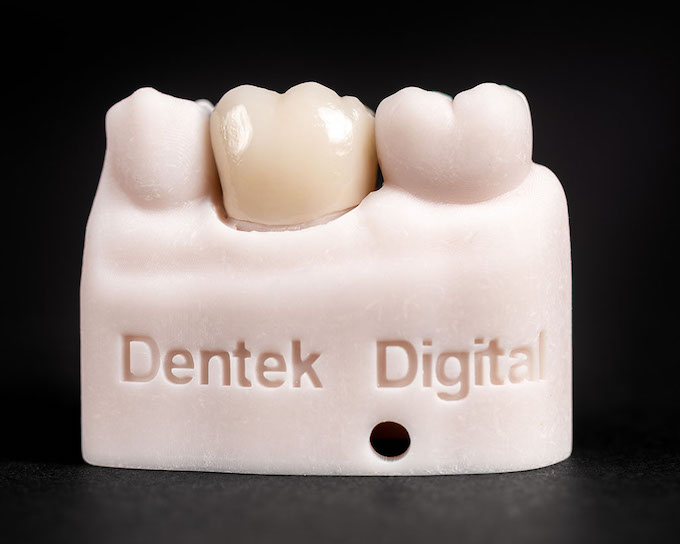
Why Anatomy Matters in Every CAD Restoration
Great restorations start with great anatomy. Dental anatomy design is the foundation of every crown, bridge, and implant restoration built in a modern digital lab. When anatomy is accurate, restorations fit well, function properly, and look natural.
However, anatomy in CAD design is more than just shaping a tooth. It involves understanding occlusion, contact points, emergence profiles, and the surrounding tissue. Each detail influences how the restoration performs in the patient’s mouth.
At Dentek Digital, our team applies deep anatomical knowledge to every case we design. We serve dentists and dental practices across Phoenix, Scottsdale, Mesa, Chandler, and Gilbert. Therefore, we understand the clinical demands our partner practices face every day.
The Core Anatomical Principles Behind CAD Design
Every CAD design begins with a digital scan. From there, our technicians analyze the case using specialized software. They evaluate the tooth’s natural form, the opposing arch, and the surrounding dentition.
Furthermore, our team considers the patient’s bite and functional movements. These factors directly shape how the restoration is designed. Ignoring them can lead to premature wear or occlusal issues.
Occlusal Anatomy and Bite Function
The occlusal surface — the chewing surface of the tooth — is the most complex part of any restoration. It must match the patient’s natural bite pattern. Additionally, it must handle the forces of chewing without causing stress on adjacent teeth.
In CAD design, technicians carefully map cusps, fossae, and ridges. These features guide food away from the gum tissue during chewing. As a result, a well-designed occlusal surface protects both the restoration and the surrounding teeth.
Moreover, our software allows us to simulate jaw movement in real time. This means we can refine cusp heights and contact angles before the restoration is ever milled. Dentists in Scottsdale and Gilbert consistently report fewer occlusal adjustments at delivery because of this step.
Proximal Contacts and Tooth Spacing
Proximal contacts — the areas where teeth touch side by side — are critical to gum health. Too loose, and food packs between the teeth. Too tight, and the restoration becomes difficult to seat.
Therefore, our technicians design proximal contacts with precision. We use digital contact analysis to find the right pressure and location. This approach reduces chairside adjustments and improves patient comfort.
In addition, proper contact design helps maintain the spacing between teeth over time. This is especially important in posterior restorations, which handle heavier bite forces.
Emergence Profile and Soft Tissue Harmony
The emergence profile describes how a restoration transitions from the margin to the visible tooth surface. It plays a major role in gum health and overall esthetics. Because of this, it is one of the most carefully considered aspects of our CAD workflow.
A well-designed emergence profile supports the gum tissue. It creates a natural-looking transition from the crown or implant to the gumline. On the other hand, a poorly designed profile can lead to tissue inflammation or recession over time.
Emergence Profiles for Implant Restorations
Implant cases require especially careful emergence design. The restoration must emerge from the implant platform in a way that mimics a natural tooth root. This creates the appearance that the crown is growing out of healthy tissue.
Additionally, the profile must avoid placing excess pressure on the surrounding tissue. Too much pressure can cause tissue loss. Too little, and the tissue will not be adequately supported.
Our team works closely with dentists in Chandler and Mesa to develop emergence profiles that match each patient’s tissue architecture. First, we review the scan data. Then, we adjust the design to reflect the clinical goals of the treating dentist.
Margins and Fit Accuracy
The margin is where the restoration meets the prepared tooth structure. It must seal tightly to prevent microleakage and secondary decay. Furthermore, the margin must be smooth and cleanable for long-term success.
In CAD design, margin detection is one of the first and most important steps. Our technicians carefully trace the margin line on the digital model. Finally, the design is built outward from this precise starting point.
If you want to streamline this process for your practice, contact Dentek Digital to discuss your next case with our team.
How CAD/CAM Technology Elevates Anatomical Accuracy
CAD/CAM dentistry gives dental labs powerful tools to design restorations with exceptional anatomical detail. Digital workflows allow technicians to zoom, rotate, and analyze every surface before milling begins. This level of control was simply not possible with traditional methods.
Moreover, CAD libraries contain libraries of anatomical tooth forms based on real human teeth. Our technicians use these as starting points and then customize them for each patient. As a result, every restoration reflects both proven anatomy and individual patient needs.
Digital Design vs. Traditional Wax-Up
Traditional wax-up required skilled hands and significant time. Digital design accelerates the process without sacrificing quality. In fact, CAD tools allow for more consistent anatomical accuracy across multiple units.
For example, a six-unit anterior bridge requires perfect symmetry and harmonious anatomy. Digital design tools make it easier to achieve this balance. Additionally, changes can be made in seconds rather than hours.
However, technology alone is not enough. Skilled technicians who understand anatomy deeply are still essential. At Dentek Digital, we combine both — advanced software and experienced craftsmanship.
Designing for Different Restoration Materials
Different materials require different design approaches. Zirconia, for instance, behaves differently under load than lithium disilicate. Therefore, our technicians adjust occlusal design based on the material selected for each case.
Meanwhile, translucency and light reflection must also be considered for anterior restorations. The anatomy must not only function correctly but also appear natural. Our team accounts for these optical properties during the design phase.
Furthermore, material-specific design rules help avoid restoration failures. Proper connector sizes in bridges, adequate occlusal thickness, and appropriate cusp angles all vary by material. We apply these guidelines consistently across every case.
Practical Tips for Dentists Submitting CAD Cases
The quality of a CAD restoration depends heavily on the information provided by the dentist. Here are some practical tips to help your cases succeed:
- Capture a clean, complete scan. The margin must be fully visible in the digital impression. Retraction cord or tissue management is key before scanning.
- Include the opposing arch and bite registration. Without these, our technicians cannot design accurate occlusal anatomy.
- Note any occlusal considerations. If a patient bruxes or has a history of wear, let us know. We can design accordingly.
- Specify the restoration material. Material choice affects every aspect of the design, from occlusal thickness to contact pressure.
- Share your shade and esthetic goals. For anterior cases especially, detailed notes help us meet your expectations.
Practices in Phoenix, Tempe, and Scottsdale that follow these steps consistently receive restorations that require minimal adjustment at delivery. Explore your options by reaching out to our team to discuss your workflow.
Frequently Asked Questions About Dental Anatomy Design in CAD
What is dental anatomy design in CAD, and why does it matter?
Dental anatomy design refers to the process of recreating natural tooth form in a digital environment. It matters because accurate anatomy ensures proper fit, function, and esthetics. A restoration that mimics natural anatomy performs better and lasts longer.
How does CAD software handle occlusal design?
Most modern CAD software uses anatomical tooth libraries and occlusal simulation tools. Technicians use these features to design cusps and contact areas that match the patient’s natural bite. Additionally, dynamic occlusion simulation helps catch issues before milling.
Can anatomy be adjusted after a scan is submitted?
Yes. Our technicians can adjust the design based on prescription notes or dentist feedback. However, the more complete the scan and case information, the fewer adjustments are needed. Clear communication at submission saves time for everyone.
How does emergence profile design differ for implants vs. natural teeth?
Implant restorations require a more deliberate emergence profile because there is no natural root structure. The design must support the peri-implant tissue and create a natural appearance. Natural tooth restorations follow existing tissue contours more closely.
What happens if the margin is not clearly visible in the scan?
If the margin is unclear, our technicians will contact the submitting practice before fabrication begins. We never guess on margin placement. Therefore, a rescan or additional information may be requested to ensure accuracy.
Partner With a Lab That Understands Anatomy
Great dental anatomy design is not an accident. It results from skilled technicians, powerful CAD tools, and a deep understanding of how teeth work together. At Dentek Digital, we bring all three to every case we fabricate.
We are proud to serve dental practices across the Greater Phoenix area, including Chandler, Mesa, Gilbert, Scottsdale, and Tempe. Our team is committed to delivering restorations that fit well, look natural, and support long-term patient health.
Send us a case and experience the Dentek Digital difference. Our team is ready to support your practice with the highest quality digital restorations available today.